
How to Make Your First Investment on 8lends Step by Step
Wallet connected, KYC done, USDC ready — then two MetaMask clicks stand between you and a funded project on Base. Here is exactly what each screen asks.
Investing in a project on 8lends takes 1–2 minutes once your wallet is connected, KYC is completed (if required), and USDC has been purchased. The process consists of three steps: choosing a project on the Projects page, entering the amount (minimum 100 USDC), and confirming two transactions in your wallet — approve USDC and the investment itself. After the pool closes, the project moves to the Funded stage, and the funds go to work with the borrower. From that moment, interest and bonuses begin to accrue.
Video Tutorial
The investment process is shown in the 8lends video guide:https://youtu.be/wABYaut7zVc.
The video shows the real steps in the interface: where to find the list of projects, how to open a project card, and which windows appear in MetaMask. This text is a companion to the video for clarifying details.
What to Check Before Investing
- Wallet connected to 8lends
- KYC completed via Sumsub if you plan to invest over $500
- Your wallet balance has the required amount in USDC (minimum 100) + $2–5 in ETH for gas if you use an external wallet (not needed with the built-in 8lends wallet)
- The network in your wallet is switched to Base
Step-by-Step Instructions
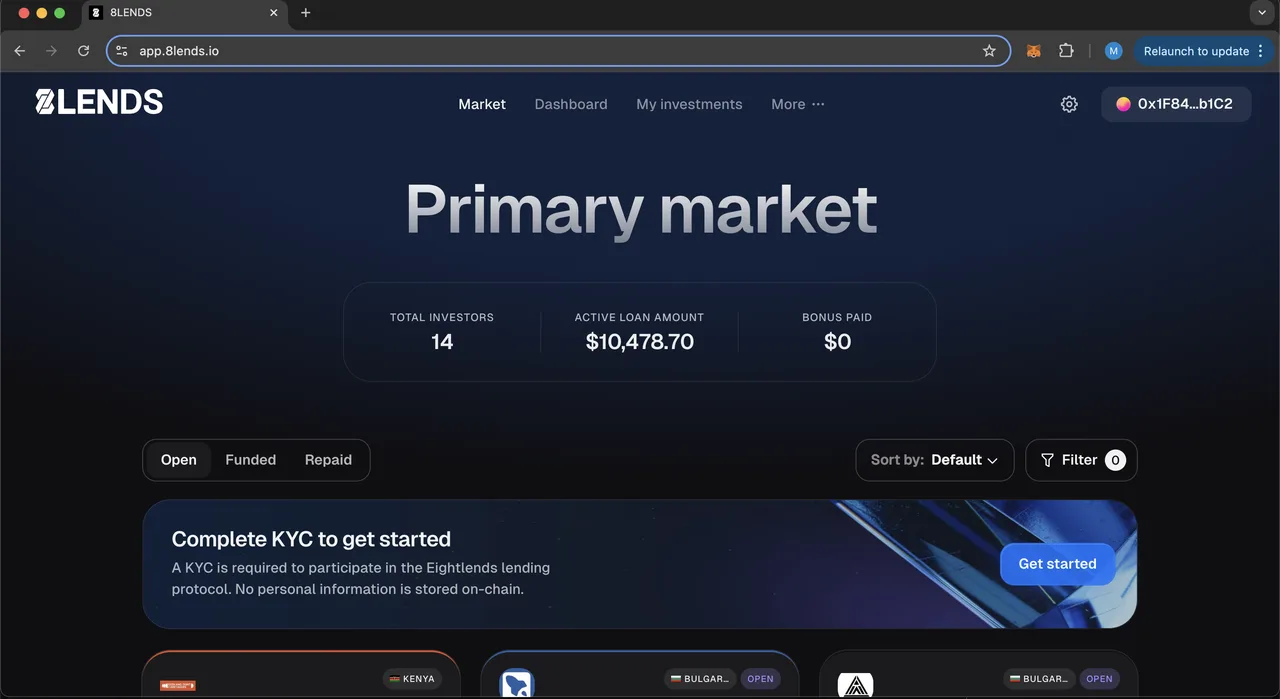
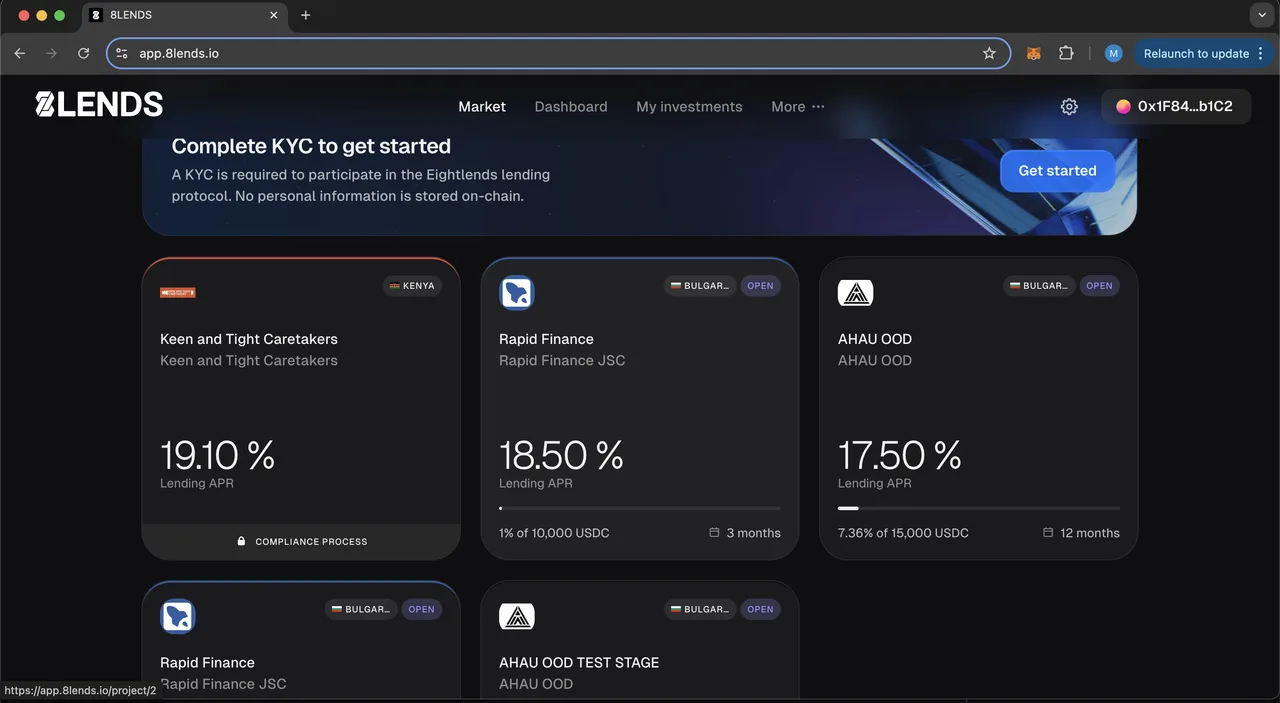
Step 1. Open the Projects Section
- Go to app.8lends.io with your wallet connected
- Open the Projects section in the main menu
- A list of projects with Open status will appear — these are the projects you can currently invest in
Step 2. Review the Project Card
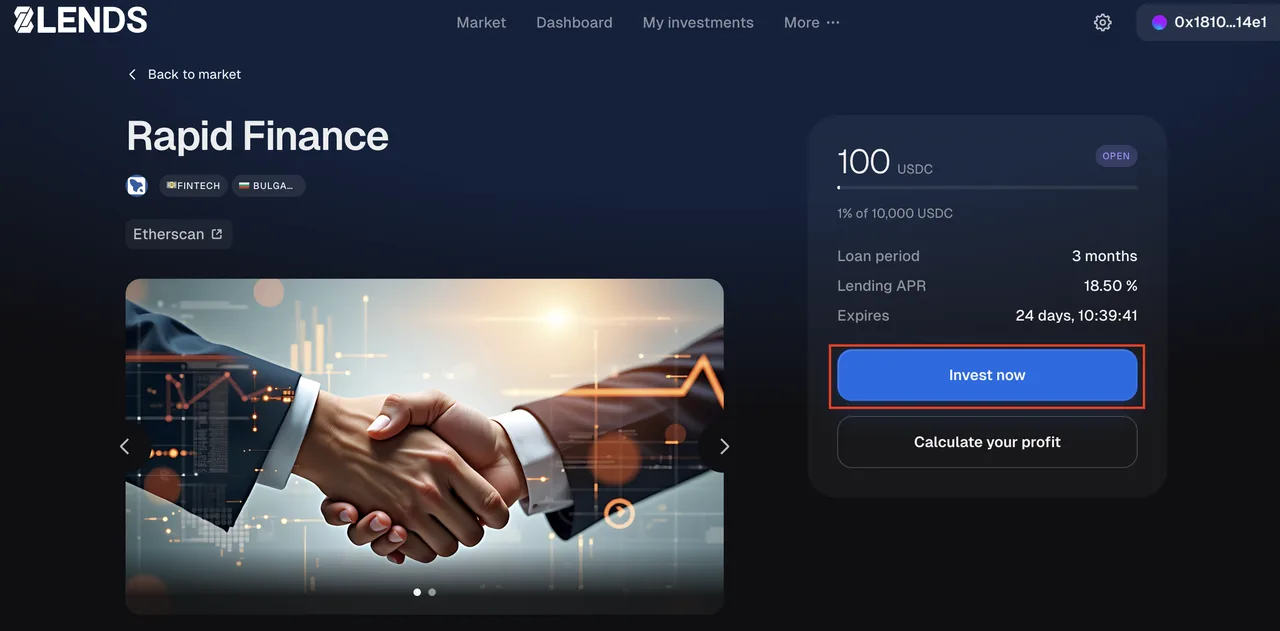
This is the most important step — don't skip it. Open the card of a project you like and check:
- Borrower name and business sector
- Credit rating — AAA, AA, A, BBB, BB, B, CCC
- APR rate (19–25%)
- Loan term — 4 to 16 months
- Pool size — the amount the borrower wants to raise
- Already raised — how much has been collected at the time of viewing
- Protection type — whether there is Buyback or only standard RWA collateral
- LTV — the loan-to-collateral-value ratio
- Collateral description — exactly what is pledged
- Due diligence documents — the Maclear AG report
- Payment terms — monthly interest + bullet payment of the principal at the end of the term
This stage is analytical. Don't rush. The more thoroughly you review it, the more informed your decision will be. For more on how to assess risk
Step 3. Click Invest now and Enter the Amount
- On the project card, click Invest now
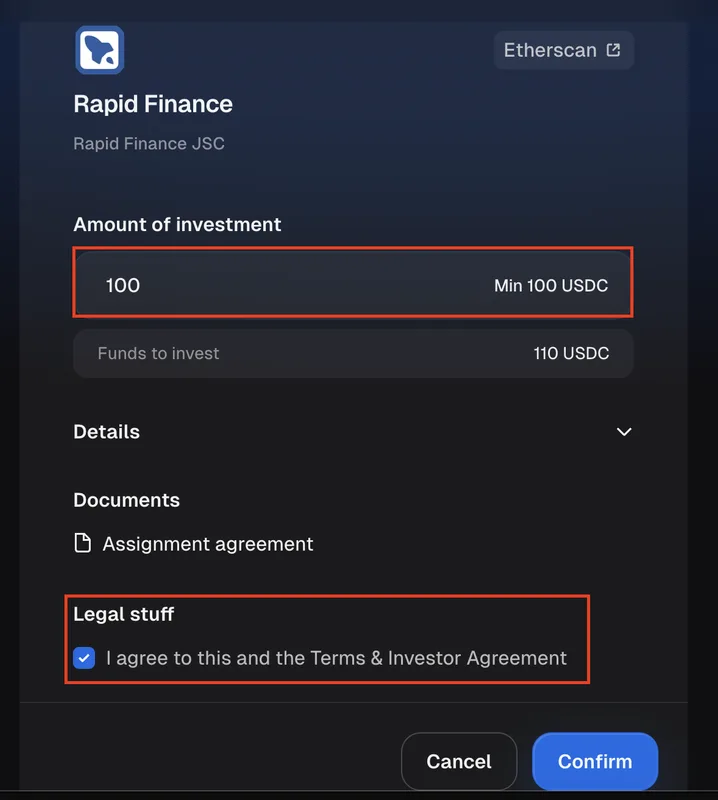
- An amount input window will open
- Enter the investment amount in USDC (minimum 100, with no upper limit imposed by the platform — only the size of the remaining pool)
- Check the box to agree to the Terms & Investor Agreement
- Click Confirm
Step 4. Confirm Two Transactions in Your Wallet
This is the technical part — the wallet will ask you to confirm two actions in a row:
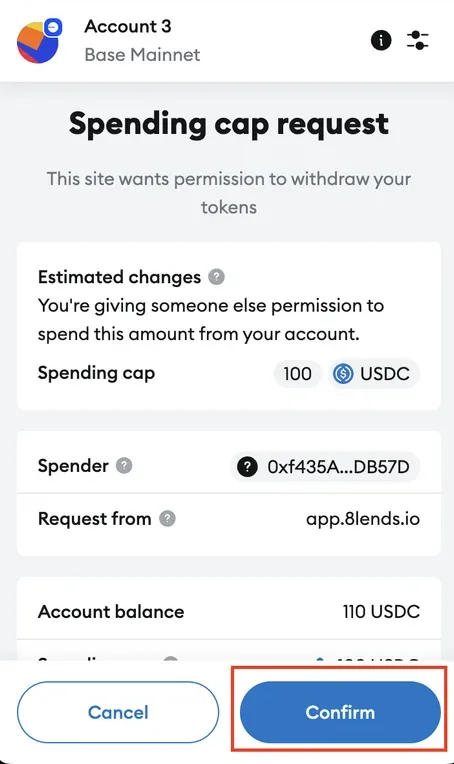
Transaction 1 — Approve USDC
- This is permission for the 8lends smart contract to use your USDC
- It is requested before every investment, for the exact amount you are investing
- Gas fee — a few cents
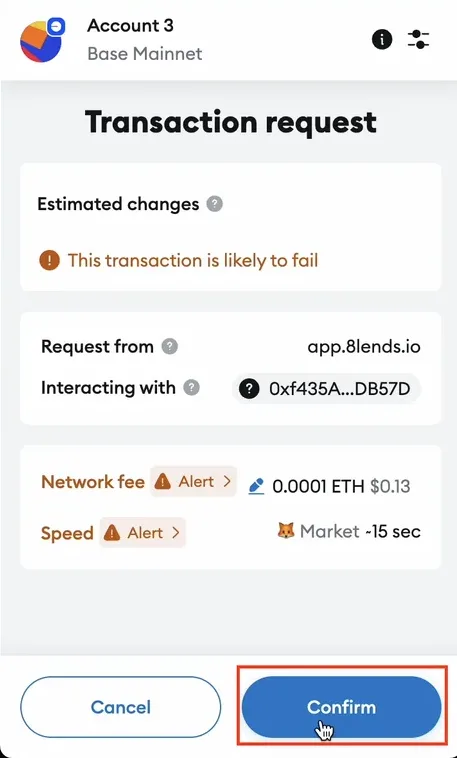
Transaction 2 — The Investment Itself
- This is the transfer of USDC into the project via the smart contract
- Gas fee — a few cents
- It is confirmed each time you invest
Step 5. Receive Confirmation
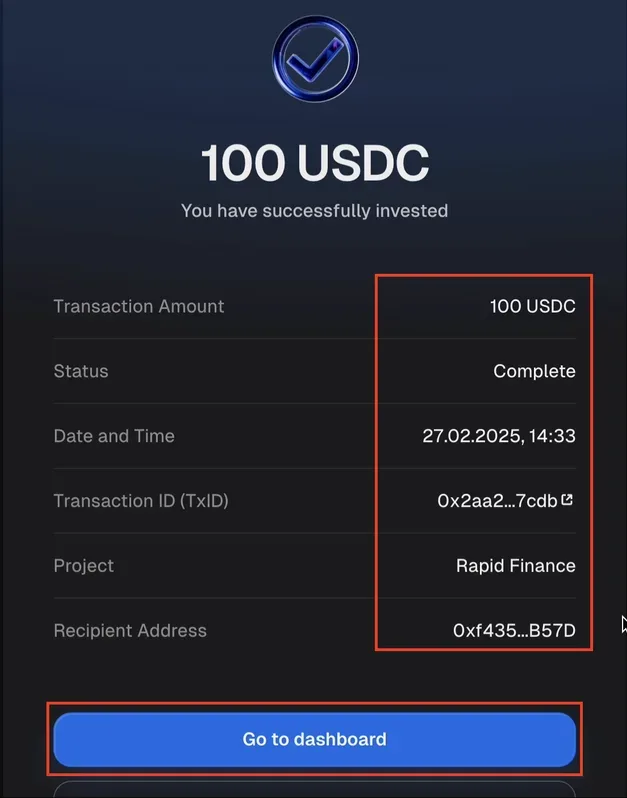
After both signatures, a successful investment screen will appear with:
- The investment amount
- The transaction ID on the Base network
- The address of the project's smart contract
- A link to basescan.org for on-chain verification
What Happens After the Investment
If the Pool Is Not Yet Closed (Open Stage)
- Your investment is reserved in the pool
- Interest is not yet accruing — the pool is still being collected
- If the pool does not reach the required amount before the deadline (Cancelled stage), you withdraw the USDC back to your wallet with the Withdraw button
If the Pool Closed Successfully (Funded Stage)
- The funds go to work with the borrower
- From this moment, interest begins to accrue (monthly)
- Welcome Bonus voucher (30 USDC) is unlocked if you have completed KYC and your first investment is at least 100 USDC — it is paid out with the principal of your next investment of 100 USDC or more
- Proof of Loan +4% in 8LNDS is credited
- The first interest payment — one month after the pool closes
- Principal repayment — bullet payment at the end of the term
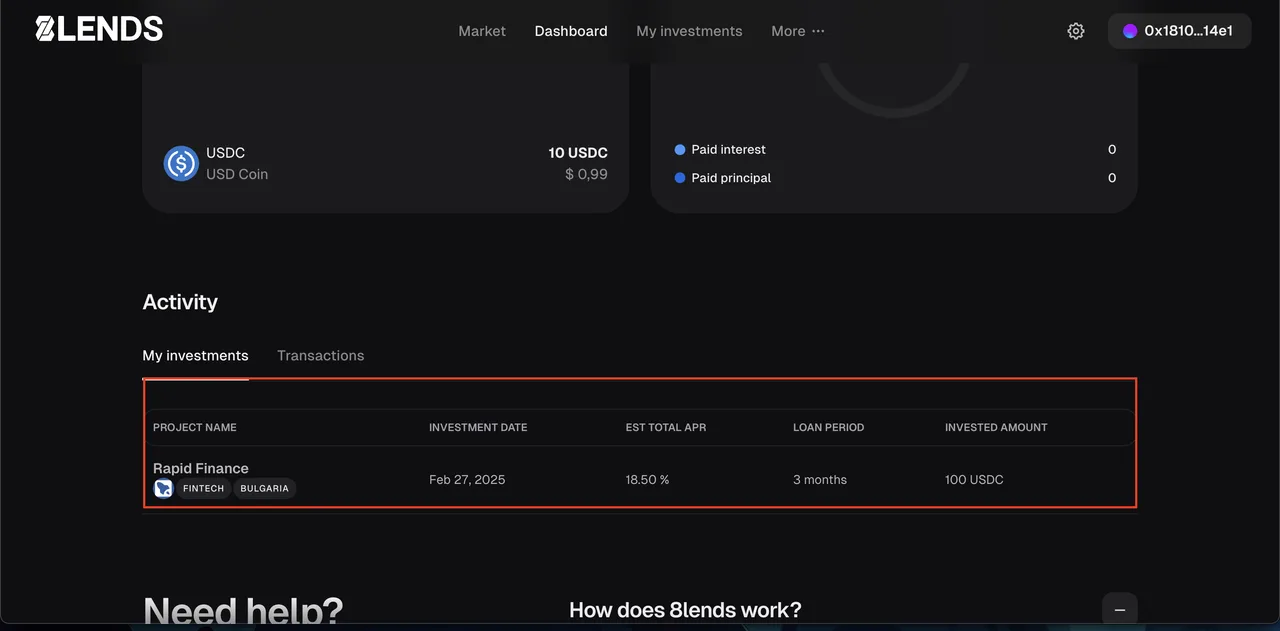
Where to View Your Investments
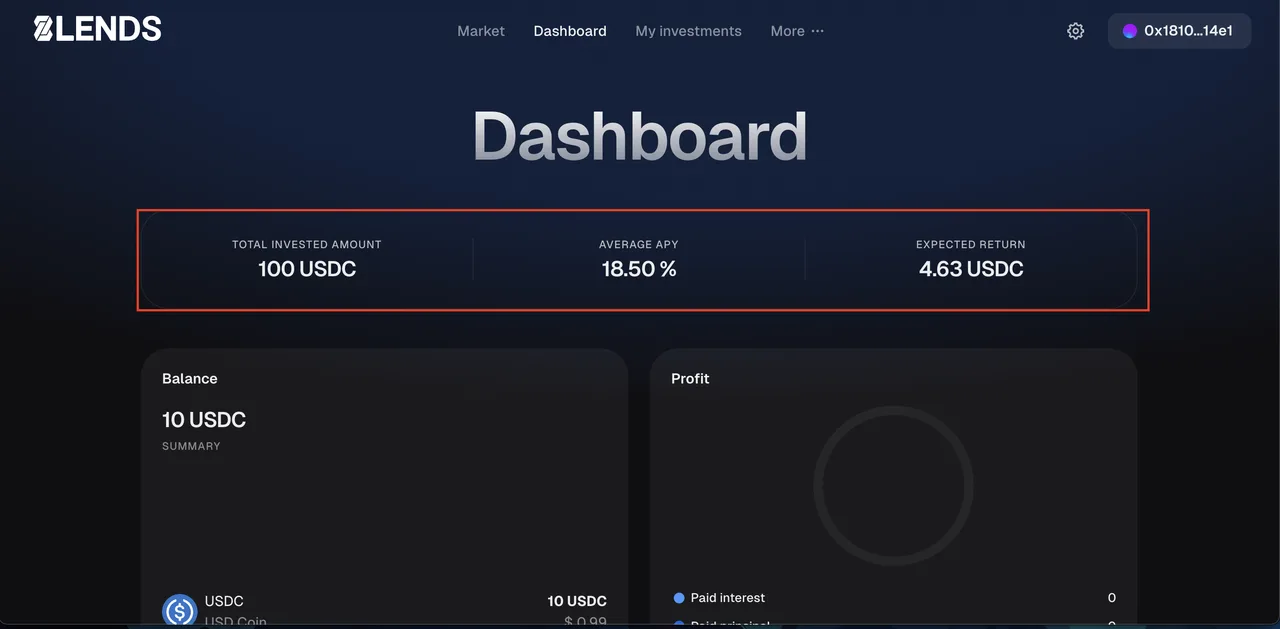
- 8lends personal account — the My Investments or Dashboard section
- basescan.org by your wallet address — all transactions on-chain
Frequently Asked Questions
Why two transactions instead of one? This is the ERC-20 token standard: first you grant the smart contract permission (Approve) to use your USDC, then the smart contract transfers it to the project. This is a safeguard: the contract cannot debit funds without your explicit permission. The interface asks for an Approve before every investment, for the exact amount of that investment.
What is the Spending cap in the Approve window? This is the limit you allow the smart contract to use. By default, 8lends requests permission for the amount of the specific investment — this is safer than unlimited. If you are offered to set a larger amount or unlimited, this is convenient for future investments without repeated approvals, but it increases risk in case the contract is compromised. The decision is yours.
What if I entered the wrong amount? If the transaction has not yet been signed — simply cancel it in your wallet (the Reject button). If it has already been signed and the funds have gone to the project — it cannot be canceled. You can sell the position via the Secondary Market, but this incurs a 5% fee charged to the seller.
How much does it cost to invest in one project? Minimum — 100 USDC. Maximum — limited only by the size of the project's remaining pool. The platform does not charge a fee to the investor — you will only pay Base network gas (a few cents).
Can I invest in several projects at once? Yes. Each investment is a separate transaction. Each investment requires its own Approve for the exact amount — all projects use the same Fundraise contract, so the steps are identical for every project. Diversification is recommended.
What if the pool doesn't close and the project doesn't raise the amount? If the project moves to the Cancelled stage, you withdraw the USDC back to your wallet with the Withdraw button. No losses, except for the gas fee on the original transaction.
When will I see interest in my account? The first interest payment — one month after the pool closes (Funded stage). This is the same logic as with bonuses: interest accrues from the moment the money is actually working, not from the moment you "put it in the pool." For more details
Can I withdraw an investment before the pool closes? No, not in the current version of the platform. After the transaction is confirmed, the funds remain in the pool's smart contract until it closes. If the pool does not close — you withdraw your deposit with the Withdraw button. If it closed — you can sell the position via the Secondary Market.
What does "Confirm Terms & Investor Agreement" mean? This is agreement with the 8lends user agreement and investor terms. The document describes the rights and obligations of both parties, the risks of investing, and the legal conditions. It is recommended to read it before your first investment.
How can I verify that the investment actually went through? There are three ways: (1) the success screen in the platform itself, (2) the My Investments section in your 8lends personal account, (3) the transaction ID on the Base network — open basescan.org, paste the ID, and you'll see the on-chain confirmation.
What to do if a transaction is "stuck"? If a transaction is sent but takes a long time to confirm — this is usually a matter of gas. The Base network is fast, and transactions confirm in seconds. If it's stuck — check your internet connection. As a last resort, you can "speed up" the transaction through your wallet settings (Speed up in MetaMask).
See also:
- How to Start Investing on 8lends: Video Overview
- Registration and Connecting a Wallet on 8lends
- Completing KYC via Sumsub on 8lends
- Data Security and KYC on 8lends: How Data Is Protected
- How to Set Up a Crypto Wallet for 8lends
- How to Buy or Swap USDC and ETH on Base for 8lends
- Project Stages on 8lends: Open, Funded, Repaid, Cancelled
- How Monthly Interest Payouts Work on 8lends
- How to Diversify Investments on 8lends
Risk disclosure: investments on 8lends carry risk, including the possible loss of principal. The 19–25% return is realized upon the borrower's timely repayment of the loan and is not guaranteed. Past results do not guarantee future ones. 8lends is a platform operated by CLEARCHAIN CORP, registered with FINTRAC (Canada) as a Money Services Business. Maclear AG (Switzerland), a member of PolyReg SRO under the supervision of FINMA, acts as the Collateral Agent. Regulatory framework as of September 2026.